Somewhere in your company there is a chat channel called #detection-feedback. It launched with a cheerful pinned message (“Tell us what’s noisy!”), got forty messages in its first month, three in its second, and is now used only for a quarterly “is anyone reading this?” from someone in L1. Nobody answered the forty, and nobody closed them either. They weren’t fixed and they weren’t rejected. They just stopped being anyone’s problem, which most SOCs treat as the same thing as solved.
TL;DR: Feedback with no owner and no ending isn’t feedback, it’s landfill. Make every complaint a tracked object that ends as “solved” or “closed without a fix, and here’s why”, and never archive anything before one of those two has happened.
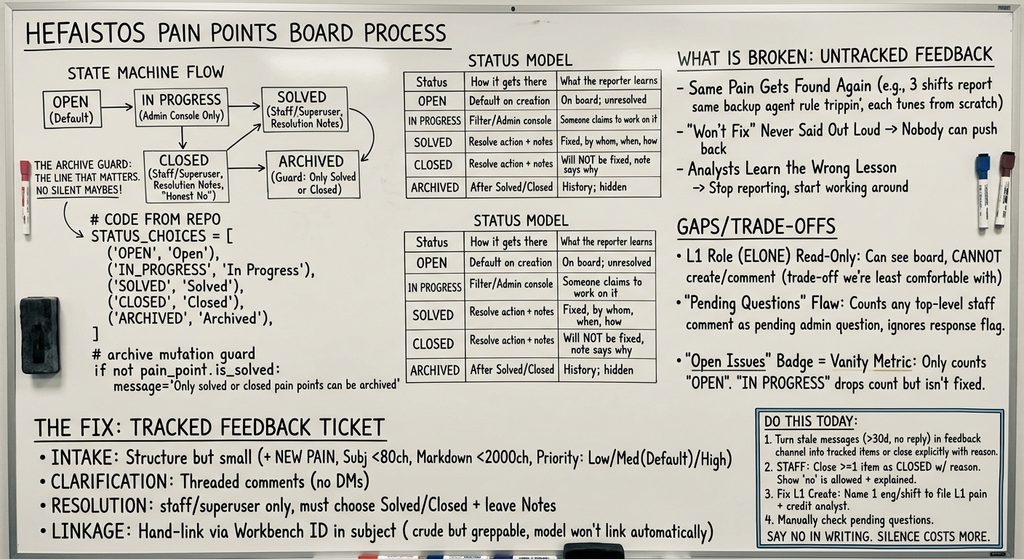
What is actually broken: feedback with a start and no ending
Chat channels, retro sticky notes and the shared “detection-requests” mailbox all have the same design flaw. They record that a complaint was made. They never record that it ended. With no states, silence becomes the default answer, and silence looks exactly like progress.
Three things follow, and none of them show up on a dashboard:
- The same pain gets found again. The backup agent that trips the rule every night gets reported by three shifts in three different threads, and each time somebody tunes it from scratch.
- “Won’t fix” is never said out loud. So nobody can push back on it. A clear no with a reason can be argued with. A silent maybe can’t be.
- People learn the lesson you’re actually teaching. After two ignored reports, the analyst stops reporting and starts working around the problem. That’s what an untracked feedback loop teaches, and it teaches it fast.
Better intentions won’t fix this. A state machine will, and the most important state in it is the one most teams won’t build: closed, not fixed, with a reason.
Proof: the status model, straight from the code
HEFAISTOS has a board for this called Pain Points. The code is public in the HEFAISTOS repository on GitHub, so here is what it actually enforces, not what a slide would claim:
STATUS_CHOICES = [
    ('OPEN', 'Open'),
    ('IN_PROGRESS', 'In Progress'),
    ('SOLVED', 'Solved'),
    ('CLOSED', 'Closed'),
    ('ARCHIVED', 'Archived'),
]

def mark_as_closed(self, resolved_by_user, notes=''):
    """Mark this pain point as closed without solution (only by admin/superadmin)"""

# archive mutation
if not pain_point.is_solved:
    message='Only solved or closed pain points can be archived'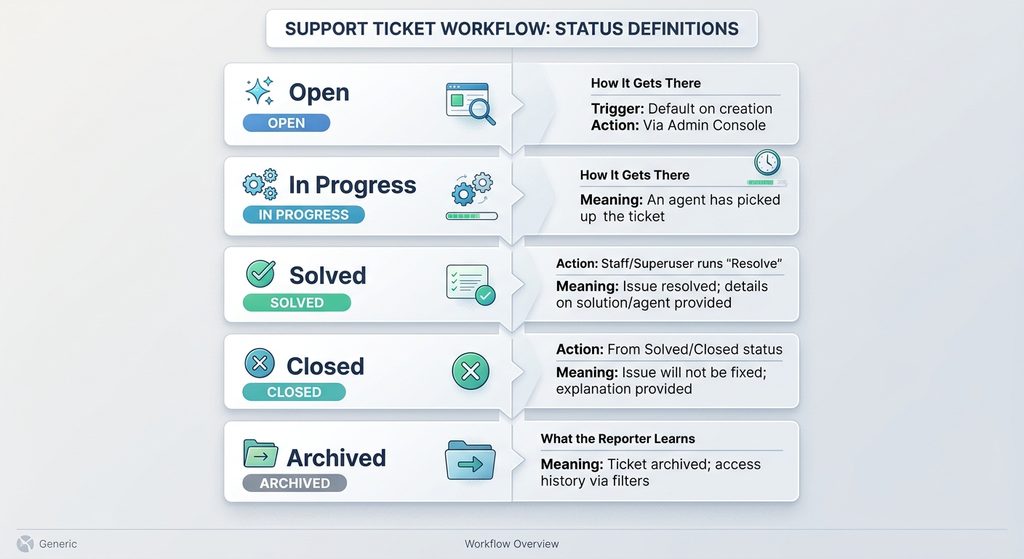
The archive guard is the line that matters. Most trackers let you sweep an embarrassing ticket into “archived” without ever answering it, which is the chat-channel problem with a nicer UI. Here, anything that leaves the board has passed through Solved or Closed, and both of those store resolved_by, resolved_at and up to 1000 characters of resolution notes. “Closed” is the honest no: the docstring literally calls it “closed without solution”.
The same code shows three things we’re not proud of. You’d find them yourself in an afternoon, so here they are:
- The people who feel the most pain can’t file it. The L1 role, ELONE, gets exactly four menu entries: L1 Portal, Knowledge Base, Pain Points and My Profile. Then the create call refuses it with
Read-only role: ElOne users cannot create pain points, and comments get refused the same way. L1 can read the board but can’t add to it. That follows from ELONE being read-only everywhere, and it’s the trade-off we’re least comfortable with. - “Pending questions” doesn’t check whether the question was answered. The query promises “pain points that have unanswered admin questions”. What it actually returns is every open pain point with a top-level comment from a staff account. Comments carry an
is_response_to_questionflag, but the query never looks at it, so an answered question still counts as pending. - The “Open Issues” badge only counts Open. The counter filters
status='OPEN'. Move an item to In Progress and the number drops, even though nothing has been fixed. That’s a vanity metric we built ourselves.
The fix: Pain Points as a ticket that has to end
Here is how the board works today, and how to use it so the gaps above don’t hurt you.
Intake is structured but small. + NEW PAIN opens a form with a subject of up to 80 characters, a Markdown description of up to 2000 characters, and a priority: Low (“Nice to have”), Medium (“Should fix”, the default) or High (“Urgent fix needed”). The form shows a short tips list: be specific, include steps to reproduce, mention the impact on your workflow, suggest a solution, and set the priority honestly. For detection pain, that means the rule name, the host or account that trips it, how often, and what the analyst did about it.
Clarification happens in a thread, not a DM. Comments are threaded, and the model’s own example is an admin asking “What part of portal?” with the reporter replying underneath. The question and its answer stay attached to the pain point, where the next person to hit the same problem will find them.
Resolution has to be written down. Only staff or superuser accounts can resolve, and resolving means choosing Solved or Closed and leaving notes. The board can be filtered by status and priority. Archived items stay out of the default view, and the board has no delete action, so “we decided this in March” can actually be looked up.
Link it by hand, because the model won’t. A pain point has no field pointing at a workbench, rule or data source. Put the workbench ID in the subject. That’s crude, it works, and it stays greppable. If the pain is really a telemetry gap, the Data Catalog is where that fact should end up once someone has confirmed it.
The bigger point holds whatever tool you use. A feedback loop needs an owner who is allowed to say no, a state for “no”, and a rule that nothing disappears without one of the two endings.
Do this Today
- Open your feedback channel and list every message older than 30 days that never got a reply. Turn each one into a tracked item with a priority, or close it explicitly with a one-line reason. Don’t just leave it.
- Decide who holds staff rights to resolve, then have that person close at least one item as Closed with a written reason. The team needs to see that “no” is an allowed answer and that it comes with an explanation.
- Because ELONE can’t file, name one engineer per shift who files pain points for L1 and credits the analyst in the description. And because the pending-questions view can’t be trusted yet, check open items by hand to see whether the reporter has already answered.
Say no in writing. Silence costs you more.
Featured image generated using Artificial Intelligence (EU AI Act transparency notice).